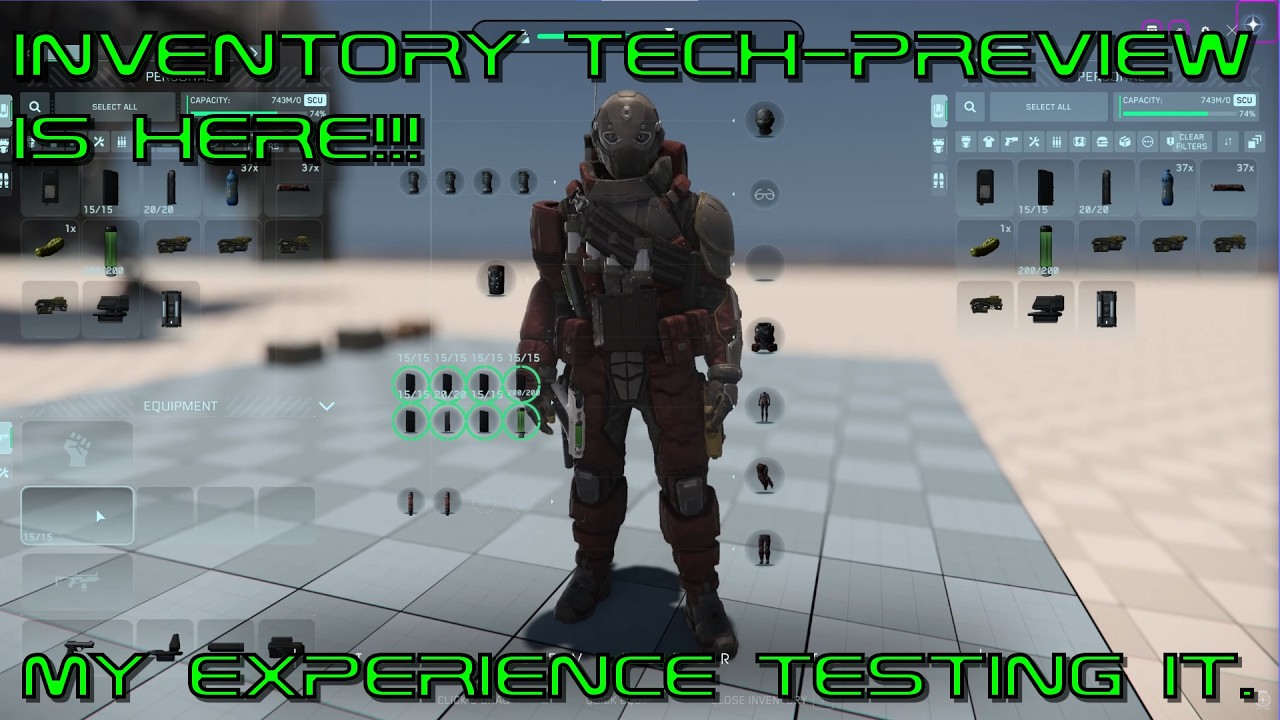
The video provides a detailed overview of the new inventory user interface (UI) showcased in a recent tech preview. The presenter compares the current system with the new one, highlighting that some features like weight tracking are not yet implemented, likely due to the absence of crafting mechanics. The inventory tabs represent different storage types, including the player character, nearby containers, and home storage accessed via terminals. Users can flip the arrangement of these tabs for convenience, and a new “All” tab aggregates all items on the character, improving inventory management.
A standout feature is the search functionality, which works efficiently to filter items by keywords, such as searching for all knives in the inventory. Sorting options have also been enhanced, allowing users to organize items by name, type, or mass in ascending or descending order. The stacking feature works well within the player’s inventory, automatically combining identical items when picked up, although it does not function in home storage containers yet. The system supports multiple nearby containers within a three-meter radius, enabling quick looting of multiple boxes or NPC bodies, which significantly speeds up the process.
The presenter notes a minor exploit where players can access containers through walls or windows if they remain within the three-meter range, suggesting this is an area for improvement. The gear section has been revamped to allow carrying an additional weapon beyond the usual slots, which offers more flexibility during gameplay. The interface also includes dedicated tabs for weapons, gadgets, grenades, magazines, medical supplies, and armor, each with intuitive drag-and-drop mechanics and visual indicators for ammo or resource levels.
One notable missing feature is the lack of a preview when equipping armor pieces, which was present in the old system and helped players decide whether to keep or discard items. The ship cargo management has also been improved, with cargo grids displayed as separate tabs corresponding to different sections of the ship, allowing for easier organization and transfer of items. However, items must be manually picked up from the cargo grid before being moved elsewhere, and some ships like the Caterpillar have overly complicated cargo grid splits that need refinement.
Overall, the presenter expresses a positive impression of the new inventory UI, praising its responsiveness, ease of use, and improvements like the stack-all button and multi-container management. While some small tweaks and bug fixes are needed, the system feels like a significant upgrade over the current version and is likely to be included in an upcoming patch. The video concludes with an invitation for viewers to ask questions and feedback, emphasizing the presenter’s enthusiasm for the new changes.